Salesforce Editions Explained: Essentials vs Professional vs Enterprise

Salesforce Edition is a specific bundle of features and functional limits (Essentials, Professional, Enterprise) that determines the overall capability of a company’s CRM platform.
Salesforce License is a per-user permit that grants an individual access to the company’s Salesforce edition. While the Edition defines what the system can do, the License defines who can do it.
Many small and mid-sized businesses begin their journey with basic CRM tools or even spreadsheets. At first, they’re enough. But as sales pipelines grow and teams expand, those early systems start to crack.
This is usually the moment businesses start looking at Salesforce and face a new question:
Which Salesforce edition is right for us?
Each Salesforce edition is designed for a different stage of business maturity. Choosing the wrong one can lead to unnecessary costs or, worse, a system that teams don’t fully adopt.
In this article, we’ll break down Salesforce Essentials, Professional, and Enterprise in simple terms – with a clear focus on SMBs operating in the UAE and Saudi Arabia.
By the end, you’ll understand:
- What Salesforce editions are and why they exist
- The real differences between Essentials, Professional, and Enterprise
- Which edition fits different SMB growth stages
- How UAE & Saudi businesses typically choose and scale Salesforce
Why Salesforce has multiple editions
Salesforce is not a single “one-size-fits-all” product.
Instead, it’s a modular platform designed to grow with a business. Different editions exist to balance cost, complexity, and capability – so smaller companies aren’t forced into enterprise-level setups before they’re ready. For SMBs, this matters because:
⮕ Overbuying leads to wasted budget and low adoption
⮕ Underbuying creates limitations just when growth accelerates
Understanding the editions upfront helps you invest in Salesforce not as a software license but a growth foundation.
What Is a Salesforce edition and how it differs from a license
Salesforce edition is a package of features and capabilities available to your entire organization. It determines what the system can do, including customization, automation, data management, and scalability.
Before comparing them, we need to make one important clarification. Salesforce editions and Salesforce licenses are not the same thing. An edition is basically the “level” of Salesforce your company runs on:
⮕ Edition = what you’re paying for overall
⮕ License = how many people use it
You don’t buy features one by one. You buy a package of capabilities – and the higher the edition, the more the system can do for your business.
With this understanding, let’s uncover Essentials, Professional, and Enterprise editions – the three most relevant for SMBs in the UAE and Saudi Arabia. Other editions, like Unlimited or Developer, exist, but they’re usually aimed at large enterprises or development/testing purposes – not everyday operations for companies of such scale.
| Edition | What’s Great About It |
| Essentials | Designed for small businesses getting started with CRM to boost sales or service productivity. It includes a setup assistant and administration tools to customize your deployment as you grow. |
| Professional | Designed for businesses requiring full-featured CRM functionality. It includes straightforward and easy-to-use customization, integration, and administration tools to facilitate any small to midsize deployment. |
| Enterprise | Meets the needs of large and complex businesses. It gives you advanced customization and administration tools, in addition to all the functionality available in Professional Edition, that can support large-scale deployments. Enterprise Edition also includes access to Salesforce APIs, so you can easily integrate with back-office systems. |
| Unlimited | Maximizes your success and extends it across the entire enterprise. It gives you new levels of platform flexibility for managing and sharing all your information on demand. Includes all Enterprise Edition functionality, Premier Support, full mobile access, unlimited custom apps, increased storage limits, and other features. |
| Developer | Provides access to the Salesforce Platform, including Agentforce and Data Cloud, and to Salesforce APIs. Developers can extend Salesforce, integrate with other applications, and develop new agents, tools, and applications. Developer Edition also provides access to many of the features available in Enterprise Edition. |
Salesforce Essentials: built for very small teams
Best for: Startups and very small businesses with basic CRM needs.
Salesforce Essentials, or Starter, was designed as an entry-level CRM for teams that want structure without complexity.
What Essentials does well
- Centralizes contacts and customer information
- Tracks leads and basic sales opportunities
- Provides simple dashboards and reports
- Easy to set up with minimal customization
For very early-stage businesses, Essentials offers a cleaner alternative to spreadsheets and disconnected inboxes.
Where Essentials falls short
- Limited automation capabilities
- Restricted customization options
- Not ideal for multi-stage sales processes
- Can feel restrictive as soon as deal volume grows
Essentials in the UAE & Saudi context
In the Gulf, many SMBs grow faster than expected – especially in sectors like professional services, real estate, logistics, and B2B trading. Businesses often outgrow Essentials quickly once they hire more salespeople or expand into new Emirates or cities.
In practice ➡️ Essentials works best as a temporary starting point, not a long-term CRM.
Salesforce Professional: the most common choice for SMBs
Best for: Growing SMBs with active sales pipelines and multiple users.
Salesforce Professional is where Salesforce starts to feel like a serious business platform rather than just a contact database.
Key advantages of Professional
- Full sales pipeline management
- Customizable fields, layouts, and objects
- Better reporting and forecasting
- Email integration and productivity tools
- Supports more complex sales processes
- Accessible price
This edition gives SMBs the flexibility to reflect how they actually sell – without overwhelming teams.
Limitations to be aware of
- Automation is still limited compared to Enterprise
- Advanced approval workflows are not available
- Customization depth has boundaries
Why Professional fits UAE & Saudi SMBs
Professional fits SMBs in the Gulf that have structured sales teams and predictable pipelines. However, once businesses expand into new Emirates, cities, or product lines, the lack of automation and integration flexibility often slows teams down.
In practice ➡️ Professional is a solid mid-step, but rarely the final destination for growing SMBs.
Salesforce Enterprise: built for scale, control, and automation
Best for: SMBs with complex operations or fast growth, regardless of team size.
Salesforce Enterprise gives SMBs access to advanced CRM capabilities without going all the way to Unlimited.
What Enterprise adds
- Full automation without hard limits
- Custom integrations with ERP, accounting, and other systems
- Advanced security, roles, and access control
- Highly customizable, scalable workflows
Considerations for Enterprise
- Higher cost
- Some features may be redundant
- Adoption may take longer
- Requires thoughtful configuration
- Best implemented with expert support
Enterprise adoption in the Gulf
Many SMBs use Enterprise to manage client onboarding, recurring billing, and multi-department service contracts. It also supports fundraising, events, and regional marketing campaigns that require tracking across teams.
In practice ➡️ Enterprise is the best long-term move for teams with advanced business needs.
How SMBs in the UAE & Saudi Arabia should select
The biggest mistake SMBs make is choosing an edition based on price alone.
While license cost matters, it rarely reflects what the business actually needs to operate and grow. A better starting point is to look at how your business works today – and how it’s likely to work in the next 12-24 months.
If your sales process is simple and handled by just a few people, a lower edition may be enough to get started. But many SMBs in the UAE and Saudi Arabia work across multiple teams, sales steps, and markets. In these cases, restrictions in customization or integrations can become more expensive than the license itself.
The right question is not “Which edition is cheapest?” but “Which edition supports our processes without constant workarounds?” A CRM should reduce operational friction, not otherwise.
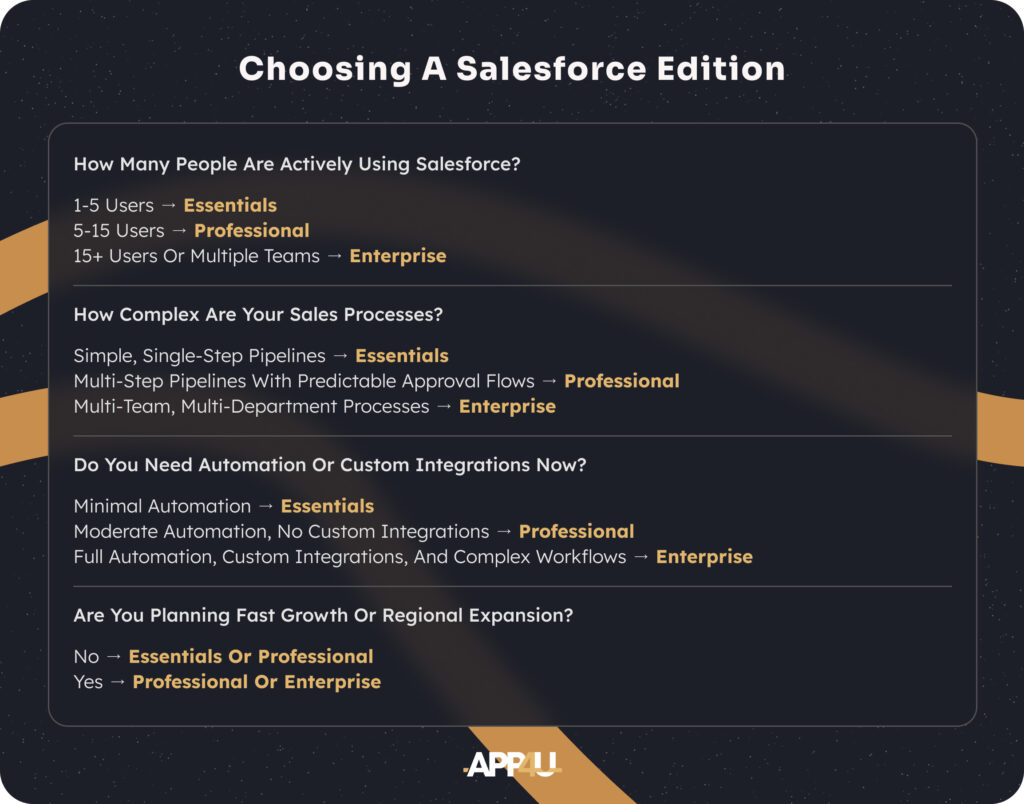
Use these simple questions to guide your choice:
⮕ How many people are actively using Salesforce?
1-5 users → Essentials
5-15 users → Professional
15+ users or multiple teams → Enterprise
⮕ How complex are your sales processes?
Simple, single-step pipelines → Essentials
Multi-step pipelines with predictable approval flows → Professional
Multi-team, multi-department processes → Enterprise
⮕ Do you need automation or custom integrations now?
Minimal automation → Essentials
Moderate automation, no custom integrations → Professional
Full automation, custom integrations, and complex workflows → Enterprise
⮕ Are you planning fast growth or regional expansion?
No → Essentials or Professional
Yes → Professional or Enterprise
Our perspective: the choice that saves time and money
Across the UAE and Saudi Arabia, many SMBs reach Salesforce Enterprise sooner than expected. Multi-location operations, stakeholder-driven deals, and structured internal processes are common – and simpler editions can’t support this reality.
Based on real implementations, we can definitely say: for most serious CRM projects, Enterprise is the most practical and future-proof option, even for SMBs.
This isn’t about selling a higher-priced edition. The real risk is operational debt. When automation is capped and integrations are unavailable, teams compensate with manual steps, external tools, and duplicated effort. Over time, this creates hidden costs that often exceed the difference between editions.
Example:
A 12-person B2B company in the UAE runs Salesforce Professional and handles invoicing in an external accounting system. Because custom integrations aren’t available, sales managers manually transfer deal data after each closed opportunity. On average:
- 10-15 minutes per deal
- ~300 deals per month
- ~60 hours of manual work monthly
At an average cost of $20-25 per hour, this results in $1,200-1,500 per month in operational overhead – far more than the price difference between Professional and Enterprise.
With Enterprise, this process is typically automated via a lightweight integration, eliminating manual effort entirely.
That said, we don’t recommend Enterprise blindly. Not every business needs it on day one, and sometimes starting smaller makes sense. But when growth plans are clear and operations are already complex, Enterprise is often the smartest long-term decision.
CTA: Unsure which edition truly fits your business? Talk to … …
Final thoughts
Salesforce editions exist to support businesses at different growth stages. Picking the one that can’t support your processes can be far more expensive in time, effort, and missed opportunities. In short:
- Essentials: Lowest cost entry point, ideal for very early-stage teams.
- Professional: Balanced price and capability, covers most SMBs’ needs.
- Enterprise: Higher cost, but often pays off quickly.
The real value comes from aligning the edition with your business reality – and implementing it with clear priorities and reliable consultants.
FAQ: Salesforce Editions for SMBs in UAE & KSA
1. Which Salesforce edition is best for SMBs in the UAE and Saudi Arabia?
For most growing companies, Salesforce Professional or Enterprise are the most practical options. Essentials works only for very early stages and is usually outgrown quickly.
2. Can an SMB use Salesforce Enterprise, or is it only for large companies?
Yes. Enterprise is not about company size but process complexity. Many SMBs in the UAE and Saudi Arabia need Enterprise features early due to multi-location operations and structured sales workflows.
3. Is it expensive to upgrade Salesforce editions later?
Upgrading editions is technically straightforward, but rebuilding automations, integrations, and processes later can be costly. Choosing the right edition early reduces rework.
4. Do Salesforce editions limit automation and integrations?
Yes. Only Enterprise and above support advanced automation and custom integrations. Lower editions have restrictions that can block growth as processes become more complex.
5. Should SMBs choose Salesforce based on license price?
No. License cost is only part of the picture. The real cost often comes from manual work, system limitations, and missed opportunities when the edition doesn’t match business needs.

![What is CRM? Guide for Growing SMBs in the Gulf [+ Use Cases]](https://app4u.dev/wp-content/uploads/2026/03/representation-user-experience-interface-design-2-scaled.jpg)